Sling Resource Resolution: How a URL Becomes a Script
Your card.html is only the fourth name AEM tries. Here is the full list, and how to prove it yourself in CRXDE.

📺 Prefer to watch? Full episode, 6 live demos: 👉
Six episodes. We built components. We built dialogs. We built templates. And every single time, one thing happened that we never explained.
We typed a URL. AEM sent back HTML.
Look at how much we have been taking on trust:
In episode four we made a folder called
card, put a file calledcard.htmlinside it, and a Card appeared on the page. Nobody told AEM where that file was.In episode five we built a dialog. A node called
cq:dialog, in the same folder. We clicked Configure and it opened. We never connected the two.In episode six our page component had no
page.htmlat all. Two small files, and every page still rendered a full HTML document.
Three things. One engine behind all of them. It is called resource resolution, and it belongs to Apache Sling.
It is two questions, not one
This is the idea that makes everything else click.
Step one — URL to resource. Sling takes the path and finds a node in the repository. That node is the resource. One rule.
Step two — resource to script. Now a completely different question: which file renders this node? Resource types, super types, selectors, search paths.
Mix these two up and nothing makes sense. Keep them apart and it all does.
Part 1 — the URL
Here is a sample AEM URL with every part in it:
/content/aeminsider/us/en/first-component.summary.html/abc?debug=true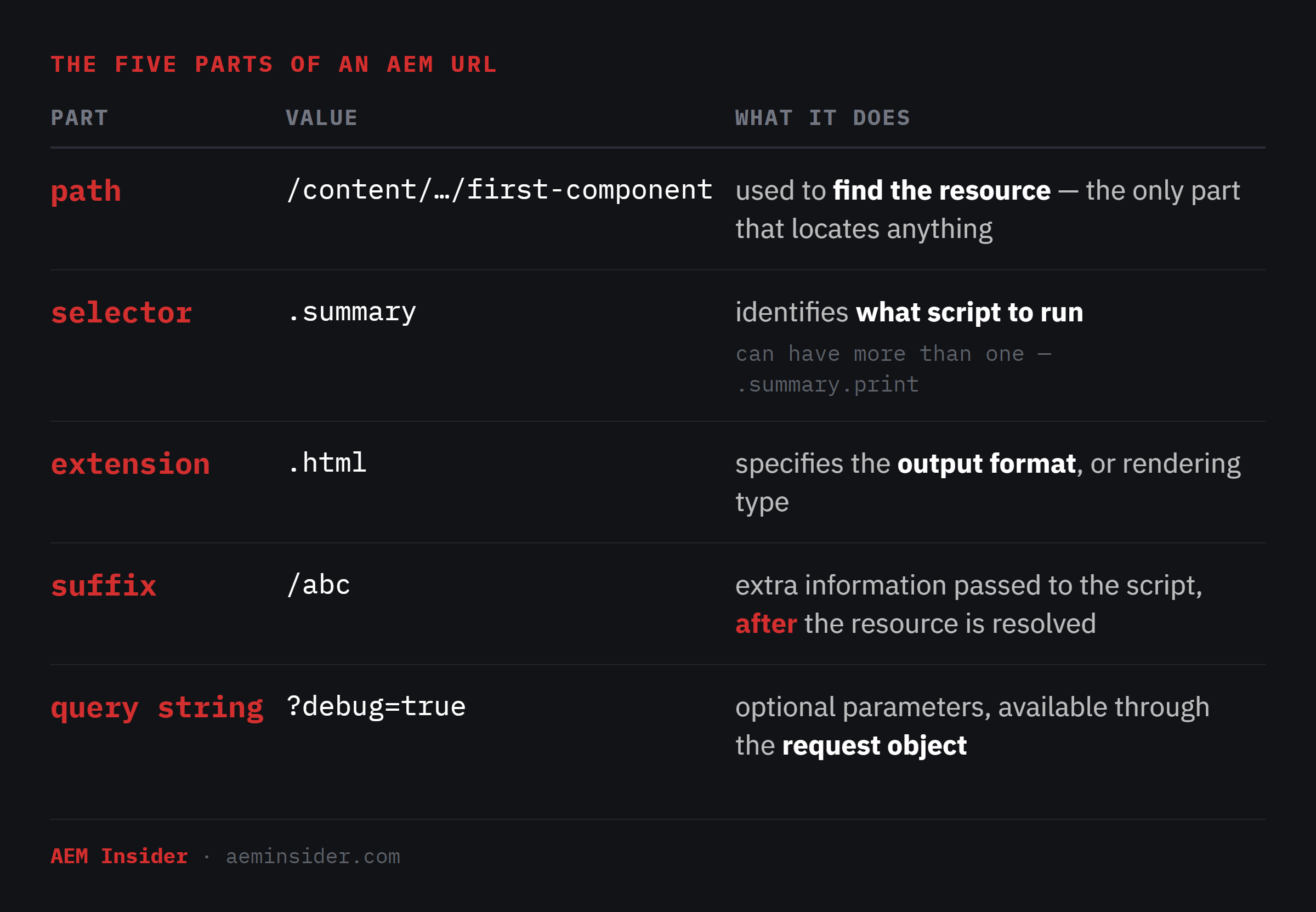
Only the path finds anything. Selectors and the extension decide what runs. The suffix and query string are just handed to the script to read.
Ask for a component on its own
You do not have to request a page. You can request any node:
http://localhost:4502/content/aeminsider/us/en/first-component/article-one/jcr:content/root/container/card.htmlThat path goes down inside the page — jcr:content, root, container, card — and you get just the Card. No header, no footer. AEM rendered one node.
Now try some variations:
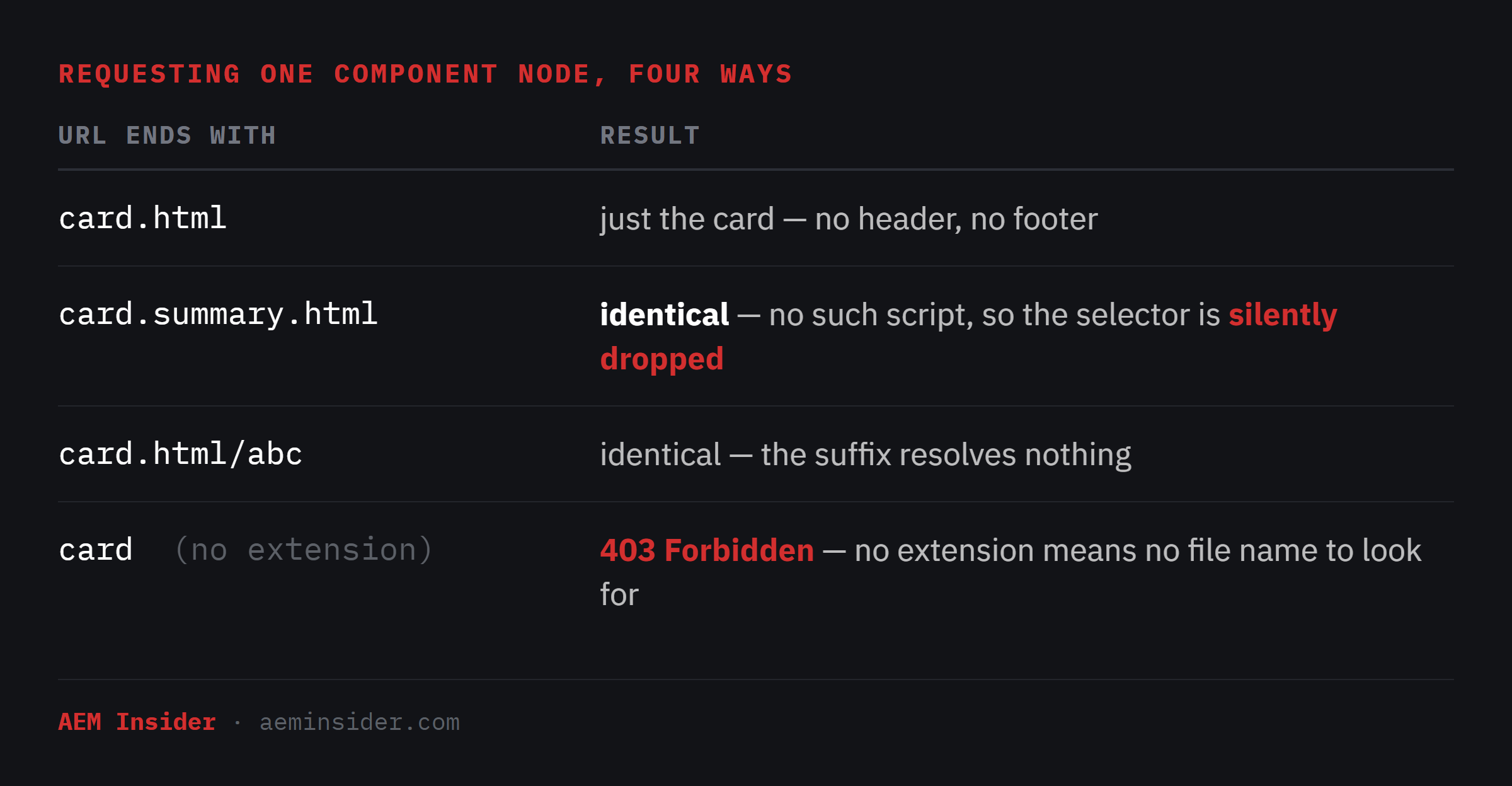
That second row matters. An unmatched selector is not an error. It is silently ignored. Your URL looks like it is doing something and it is doing nothing.
Selectors also drop from the right: card.print.summary.html will fall back to print.html if it exists.
And why does no extension give a 403? No extension means no file name to look for. (You actually get a 302 first, adding a trailing slash, then the 403.)
Part 2 — which file Sling looks for
Sling has the node. It reads sling:resourceType off it:
sling:resourceType = aeminsider/components/cardNotice there is no slash at the front. That is a relative path — I will come back to what it is relative to.
That gives Sling a folder. Now, which file in that folder?
Sling has a list of names it tries, in order, and takes the first one that exists. For the request card.summary.html:
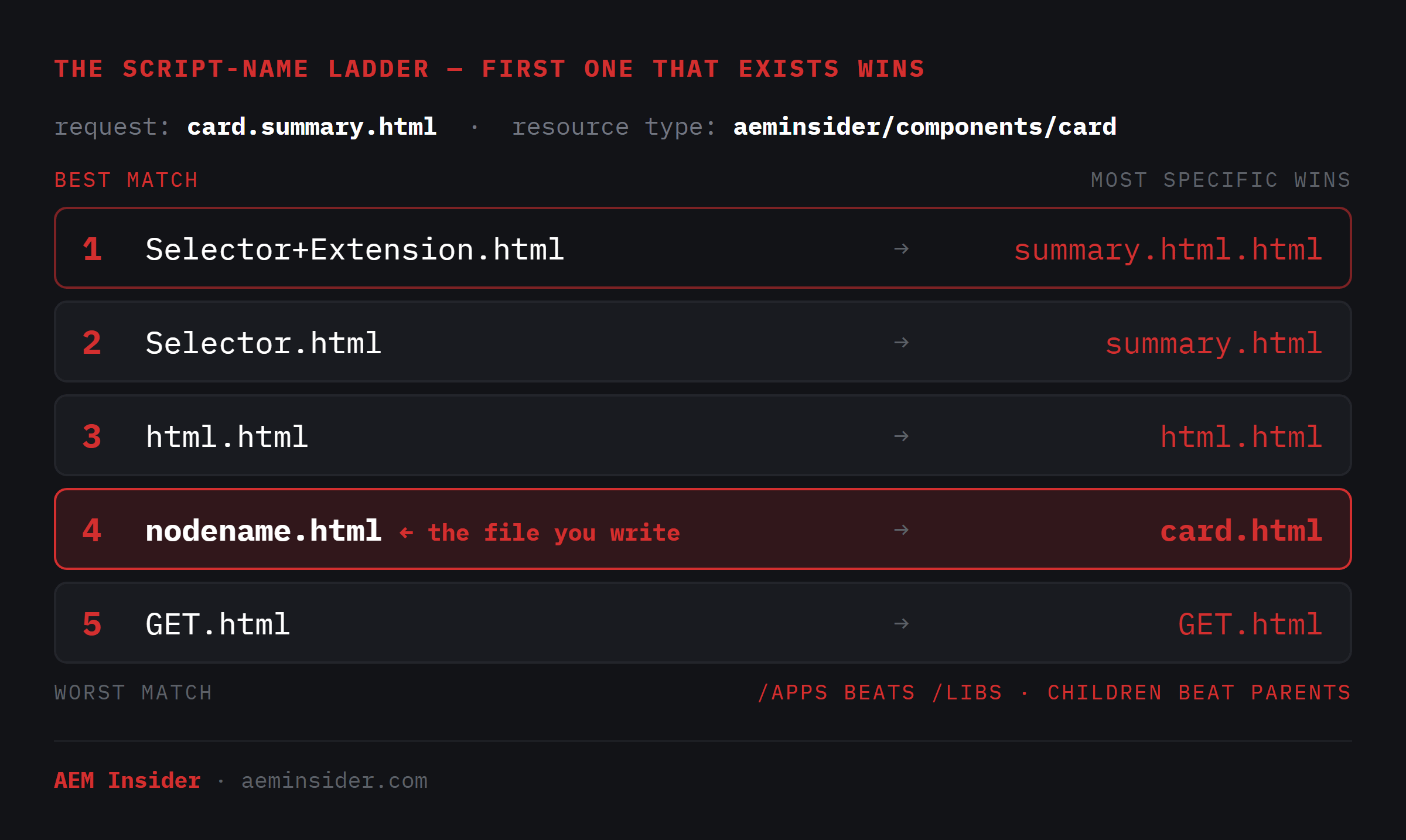
Two things about that list.
Position 4 is the component’s node name — the folder under /apps. Not the node on your page. Our component folder is called card, so the file is card.html. Call the node on the page anything you like; it changes nothing.
And look where it sits. Fourth. The file you have been writing since episode four is almost the last thing Sling tries. It only ever wins because nothing above it exists.
Prove it — walk the ladder
Create all five files in /apps/aeminsider/components/card/, one line each:
summary.html.html     <p>1 — Selector+Extension.html</p>
summary.html          <p>2 — Selector.html</p>
html.html             <p>3 — html.html</p>
card.html             (already there — the real Card)
GET.html              <p>5 — GET.html</p>
Now request one URL and never change it:
http://localhost:4502/content/aeminsider/us/en/first-component/jcr:content/root/container/container/card.summary.htmlThen delete from the top, one file at a time, refreshing after each. The answer walks all the way down the list: 1 → 2 → 3 → 4 → 5.
A warning from level three. A file named html.html is named after the extension. It answers every .html request to that component — not just the one with your selector. Drop one into a component and every instance on the site starts rendering through it. This is a real way to break a site quietly.
One thing that is not a script name: card.summary.html. It never appears in the list. A selector script is named after the selector — summary.html — not after the component plus the selector.
Want to skip the guesswork on a real instance?
/system/console/servletresolverlists the candidates in preference order for any path. It is the fastest way to settle an argument.
Part 3 — super types
sling:resourceType says: this is what I am. sling:resourceSuperType says: and this is what I extend.
When Sling needs a file and your component does not have it, it follows the super type and asks the parent. If the parent does not have it either, it asks the parent’s parent. It keeps walking up until it finds the file.
Build a second Teaser to see it. In CRXDE, create a node with three properties and no files at all:
/apps/aeminsider/components/teaser-wide        (cq:Component)
    jcr:title               = "Teaser Wide"
    componentGroup          = "AEM Insider Site - Content"
    sling:resourceSuperType = aeminsider/components/teaser
Save All. That component is empty. No script. No dialog.
Drop it on a page — it renders. Click Configure — the full episode-five dialog opens.
Sling needed a script, did not find one here, followed the super type, used the parent’s. The editor needed a dialog and did exactly the same walk. Same mechanism, twice.
Now override one thing. Add teaser-wide.html — named after this folder:
<div style="border-left:4px solid #D32F2F;padding:16px 22px;">
  <h3 style="margin:0 0 6px;">${properties.title}</h3>
  <p style="margin:0;">${properties.description}</p>
  <p style="font-family:monospace;font-size:12px;color:#727680;">rendered by teaser-wide.html</p>
</div>
Different markup. Same dialog. Same content. One file written, everything else inherited.
It works per file, not per component
Real components are not one file — they split themselves up. Add a shared piece to each:
<!-- teaser-wide/badge.html — BLUE -->
<div style="background:#1565C0;color:#fff;padding:6px 10px;">badge.html from teaser-wide (child)</div>
<!-- teaser/badge.html — ORANGE -->
<div style="background:#E65100;color:#fff;padding:6px 10px;">badge.html from teaser (parent)</div>And include it from the child’s script, with no path — just a file name:
<div data-sly-include="badge.html"></div>You get blue. The child has the file, so the child’s copy wins.
Now rename the child’s badge.html away — without touching the include line. You get orange. Teaser Wide is rendering a file that does not exist in Teaser Wide.
That is the rule: anything a component asks for, it looks for up the chain. Its script. Its dialog. A file it includes.
Part 4 — the search paths
Back to the thing I left hanging. The resource type is relative. Relative to what?
To a list called the search paths. On a standard instance it is exactly two entries:
resource.resolver.searchpath = [/apps, /libs]So take our Card. Its resource type is aeminsider/components/card. Sling puts that on the end of /apps and looks there first. Finds it, stops. If it did not find it, it would try /libs.
/apps is your project. /libs is Adobe’s. Your code is checked first.
Prove it the same way. Copy the card component into /libs, changing nothing, then rename the /apps one to card-off. The Card still renders — the path no longer exists in /apps, so it came from /libs.
Then use the badge trick again: red in /apps, green in /libs. You get red. Rename only the /apps badge and you get green — the component did not change, the include did not change, one file left /apps.
This happens per file. Every file a component asks for goes through the list on its own.
That has a name
Putting your own file at the same path under /apps so it beats Adobe’s is called an overlay. You will hear the word in every AEM project you ever join. It is not a feature — it is just the search path, used deliberately.
And it is usually the wrong tool. The moment you copy a file out of /libs, you own it forever. Adobe fixes their version, you never get the fix, and nothing warns you. Overlay when you genuinely have to. The rest of the time extend with sling:resourceSuperType instead — then you own one small file, not somebody else’s whole component.
(In the video I delete the /libs copy on camera. Do not leave one lying around.)
Part 5 — our page component, finally explained
Episode six left this open. Here is the whole component:
/apps/aeminsider/components/page
    sling:resourceSuperType = core/wcm/components/page/v3/page
    customheaderlibs.html     → injected into <head>
    customfooterlibs.html     → injected before </body>
That is it. There is no page.html. The one file you would expect is not there — and yet every page on the site renders a complete HTML document.
You already know why. Sling looks in this folder, finds no page script, follows the super type, and finds page.html in the parent. Exactly the walk we did with the badge file, on a component we did not write.
And it does not stop at one parent. Adobe’s core page component has a super type of its own:
aeminsider/components/page
    → core/wcm/components/page/v3
        → wcm/foundation/…/basicpage/v1
Three levels deep. Sling will walk the whole chain if it has to.
page.html itself is short. It writes the opening <html> tag and includes the files sitting beside it — head.html for the head, body.html for the body. So what are our two files for? They are hooks. The parent includes them deliberately, at two exact spots.
Two files of our own. A whole page renderer inherited. And two places to plug our own things in.
The whole engine, in order
Take the path and find a node.
Read the resource type off it.
Look under /apps first, then /libs.
Match the most specific file name — selector, extension, node name, method.
Nothing there? Follow the super type and repeat in the parent.
Keep walking up until you run out of parents.
Most specific wins. /apps beats /libs. Children beat parents.
That is the whole thing.
What stopped being mysterious
card.htmlwas found by name — and it is only fourth on the listThe dialog opened because a dialog is resolved exactly like a script
The page component renders a full page because it inherits one
An unmatched selector is silently dropped, not an error
A file called
html.htmlwill hijack every request to its componentAn overlay is not a feature, it is the search path used on purpose
What’s next
Twice now I have promised you clientlibs, and this episode found the doorway — customheaderlibs.html, the file in our page component that lands inside the <head> tag.
Next episode we put something real in there. Clientlibs — how CSS and JavaScript actually reach an AEM page. Categories, dependencies, embedding, and why the URL has that long hash in it.
Links
▶ Full series playlist: https://youtube.com/@aeminsider
🔗 Website: https://aeminsider.com
✎ Previous episode — Editable Templates:
Hit reply and tell me which part of resolution used to trip you up — I read every response, and the answers shape what I record next.
This is AEM Insider. Straight talk on AEM.
Not affiliated with Adobe Inc.